

Loading
  • Link to X
  • Link to Facebook
  • Link to Youtube
  • Link to Instagram
  • Link to Pinterest
  • Link to Tumblr
List Producer
  • Start Here
  • About
  • Courses
  • Blog
  • Press
  • Books
  • Speaking
  • Click to open the search input field Click to open the search input field Search
  • Menu Menu

Overwhelmed by Your Email? I Can Help!
December 9, 2014/in Apps, Increase Productivity, Reduce Stress, Saving Time, Technology, Tool for Success/by Paula Rizzo

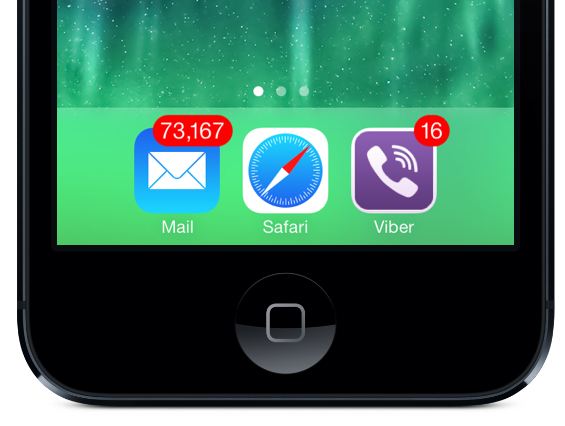
emailAccording to this study, on average we send and receive 120 emails at work every day. It’s easy to see how some of us can spend an entire day just replying to emails. So if your feeling a bit overwhelmed, don’t worry, there are several ways to fight back against the email onslaught.

Here are some tips for tackling your email inbox:

Download Boomerang – This Gmail app can help you get your inbox back down to zero. There are several useful features like being able to schedule emails to send at a later date. I love this feature for when I’m up late getting things done but don’t want my email to get lost overnight.  I just schedule it to go out in the morning and off it goes.  This is also a great feature when you want to write emails right away about a subject but don’t want to send them right away.  Let’s say you want to remind someone about a meeting or a conference.  You can write up the email and schedule it to send the day before the event.  That way you get it off your plate and still get the goal accomplished.

You can also set an incoming email to be returned to the top of your inbox at a more relevant time. So if you get an email you don’t need to deal with until tomorrow, Gmail won’t display it in your inbox, until the next day when it’ll appear right on top for you to tackle.  The service is free for up to 10 scheduled emails but after that there are paid packages.

Unroll.me* – We get so many junk emails everyday it’s a chore in itself to sift through them all. You often don’t even remember signing up for at least half of the newsletters you receive. Unroll.me identifies all the email lists you’re subscribed to and gives you the option to unsubscribe with just one click.  When I did it I was signed up for more than 300 newsletters!  You’ll be surprised how much digital clutter you can accumulate over time.

Otherinbox – This is like your own personal mail assistant. It goes through all your messages and sorts them into folders, only leaving the ones you really need front and center. It also learns your personal style, so if you move an email into a different folder it will remember and sort future emails accordingly.

Rescue Time –  A website service that lets you see how much time you are spending on different tasks. When you first start using this website you’ll be shocked by how much time you waste. Rescue Time also helps you set limits, so you only check your email for a specified amount of time before moving onto more pressing tasks.

Categorize – In your email you can set up different folders. This is great for splitting up your email into more manageable portions. Set one folder for urgent emails so you can deal with them right away. For less important emails, make it a rule to not deal with them until you’ve finished your work for the day.  Or you can break up your folders by clients or person — whatever works for you will make you better organized.

EOM — EOM stands for “end of message” and is meant to go into short subject lines.  This way you don’t waste your time writing a whole email message for something that can just be stated in a few words.  And the person getting the message knows they don’t need to open it to get more.  An example is shooting someone an email when you’re running late for a meeting.  “Going to be 10 mins late EOM” will go into your subject line and everyone will be on the same page.

How do you organize your email?

Still feeling overwhelmed? Check out my course Take Back Your Inbox, which I created to help you get control over your emails!

*Unroll.Me makes money by learning what people stay subscribed to and what they unsubscribe from – that data is valuable and helps corporations learn what people want and what they don’t want. Your email address is NOT sold. If you’d like to keep your subscription list private you’ll need to unsubscribe manually from individual email subscriptions. If you appreciate the swiftness that you can unsubscribe from multiple sources while helping brands service customers better then Unroll.Me is for you!

Tags: apps, being more productive, Boomerang, catagorize, email, how to be more organized, List Producer, listproducer.com, OtherInbox, Paula Rizzo, reduce stress, Rescue Time, Saving time, Technology, Unroll.me
Share this entry
  • Share on Facebook
  • Share on X
  • Share on WhatsApp
  • Share on Pinterest
  • Share on LinkedIn
  • Share on Tumblr
  • Share on Vk
  • Share on Reddit
  • Share by Mail
https://listproducer.com/wp-content/uploads/2017/05/ListproducerLogo.png 0 0 Paula Rizzo https://listproducer.com/wp-content/uploads/2017/05/ListproducerLogo.png Paula Rizzo2014-12-09 20:14:562017-06-15 17:30:16Overwhelmed by Your Email? I Can Help!
You might also like
5 Reasons to be a Compulsive List Maker
A List for Visiting Oprah Winfrey
4 Lists for Stress-Free Travel
List Making Will Save Your Brain
Medicine Hunter Travels the World with a List
Revamp Your To-Do List to Stop Procrastinating

Recent Posts

  • Seasonal Productivity Tips for Fall
  • How Do You Re-Invent Yourself?
  • Travel Stuff “Future” You Will Thank You For
  • Productivity Gems From Nature
  • How to Be Lazy and Also Productive

Recent Comments

    Archives

    • September 2026
    • August 2026
    • July 2026
    • June 2026
    • May 2026
    • April 2026
    • March 2026
    • February 2026
    • January 2026
    • November 2025
    • September 2025
    • June 2025
    • April 2025
    • March 2025
    • February 2025
    • January 2025
    • November 2024
    • October 2024
    • July 2024
    • June 2024
    • May 2024
    • March 2024
    • February 2024
    • January 2024
    • December 2023
    • November 2023
    • August 2023
    • July 2023
    • April 2023
    • March 2023
    • February 2023
    • December 2022
    • November 2022
    • September 2022
    • August 2022
    • July 2022
    • June 2022
    • May 2022
    • April 2022
    • March 2022
    • February 2022
    • January 2022
    • December 2021
    • October 2021
    • September 2021
    • August 2021
    • July 2021
    • June 2021
    • April 2021
    • March 2021
    • February 2021
    • January 2021
    • December 2020
    • November 2020
    • October 2020
    • August 2020
    • July 2020
    • May 2020
    • April 2020
    • March 2020
    • February 2020
    • January 2020
    • December 2019
    • November 2019
    • October 2019
    • September 2019
    • August 2019
    • June 2019
    • May 2019
    • April 2019
    • March 2019
    • February 2019
    • January 2019
    • December 2018
    • November 2018
    • October 2018
    • September 2018
    • August 2018
    • July 2018
    • May 2018
    • April 2018
    • March 2018
    • February 2018
    • January 2018
    • December 2017
    • November 2017
    • October 2017
    • September 2017
    • August 2017
    • July 2017
    • June 2017
    • May 2017
    • April 2017
    • March 2017
    • February 2017
    • January 2017
    • December 2016
    • November 2016
    • October 2016
    • September 2016
    • August 2016
    • July 2016
    • June 2016
    • May 2016
    • April 2016
    • March 2016
    • February 2016
    • January 2016
    • December 2015
    • November 2015
    • October 2015
    • September 2015
    • August 2015
    • July 2015
    • June 2015
    • May 2015
    • April 2015
    • March 2015
    • February 2015
    • January 2015
    • December 2014
    • November 2014
    • October 2014
    • September 2014
    • August 2014
    • July 2014
    • June 2014
    • May 2014
    • April 2014
    • March 2014
    • February 2014
    • January 2014
    • December 2013
    • November 2013
    • October 2013
    • September 2013
    • August 2013
    • July 2013
    • June 2013
    • May 2013
    • April 2013
    • March 2013
    • February 2013
    • January 2013
    • December 2012
    • November 2012
    • October 2012
    • September 2012
    • August 2012
    • July 2012
    • June 2012
    • May 2012
    • April 2012
    • March 2012
    • February 2012
    • January 2012
    • December 2011
    • November 2011
    • October 2011
    • September 2011
    • August 2011
    • July 2011
    • June 2011
    • May 2011
    • April 2011

    Categories

    • Apps
    • Art
    • Beauty
    • Benefits of List Making
    • Books
    • Boost Memory
    • Children
    • College
    • Contest
    • Decision Making
    • Decorating
    • Fab Find
    • Fashion
    • Fellow List Producers
    • Fitness
    • Food
    • Guest Posts
    • Happiness
    • Health
    • Holidays
    • Home
    • Increase Productivity
    • Learning With a List
    • Lights Camera Expert
    • List Making
    • Movies
    • Oprah
    • People
    • Pets
    • Radio
    • Reduce Stress
    • Relationships
    • Saving Money
    • Saving Time
    • School
    • Shopping
    • Sleep
    • Summer
    • Tea
    • Technology
    • Tool for Success
    • Travel
    • TV
    • Uncategorized
    • Video
    • Webinar
    • Weddings
    • Wine
    • Writing
    Copyright @ 2025 - List Producer - Enfold Theme by Kriesi
    • Link to X
    • Link to Facebook
    • Link to Youtube
    • Link to Instagram
    • Link to Pinterest
    • Link to Tumblr
    • Start Here
    • About
    • Courses
    • Speaking
    • Blog
    • Books
    • Privacy Policy
    Link to: 6 Friends Who Help Your Productivity Link to: 6 Friends Who Help Your Productivity 6 Friends Who Help Your Productivity Link to: Get Out of Your Comfort Zone with an App Link to: Get Out of Your Comfort Zone with an App Get Out of Your Comfort Zone with an App
    Scroll to top Scroll to top Scroll to top